When a customer pays on your website with M-Pesa, a prompt appears on their phone, they enter their PIN, and the money lands in your business account. Behind that prompt is Daraja, Safaricom’s system for connecting websites and apps to M-Pesa.
Connecting a website to Daraja takes a developer a few days. What takes longer is the paperwork that comes first. Safaricom needs to know who you are, who owns the business and who will manage the account. This guide lists what it asks for, so you gather everything once.
Checked against Safaricom’s published requirements on 23 September 2026. Safaricom updates its list from time to time; the current one is on its website.
Words you’ll meet
- Paybill and Till: the two kinds of M-Pesa business number. With a Paybill, the customer enters a business number and an account number. With a Till, also called Buy Goods, they enter one number.
- Shortcode: Safaricom’s name for your Paybill or Till number.
- Head Office: a number that sits above one or more Tills and holds their bank settlement. Daraja uses it when a Till goes live.
- Settlement: moving money from your M-Pesa business account to your bank.
- Daraja: Safaricom’s platform for connecting websites and apps to M-Pesa. Your developer works in it.
- M-Pesa Express: the prompt that pops up on a customer’s phone and asks for their M-Pesa PIN. You may also hear it called STK push.
- Sandbox: Daraja’s test version, with test money, where your developer builds before going live.
- BRS: the Business Registration Service, the government office that registers business names and companies through eCitizen.
- KRA PIN: your tax registration number from the Kenya Revenue Authority. You download the PIN certificate from iTax.
- CR12: a document from the BRS that lists a company’s directors and shareholders. You request it on eCitizen.
- Beneficial owner: a person who ultimately owns or controls the business, even if their name isn’t on the shares.
- BOF1: the form that lists a company’s beneficial owners, lodged with the BRS. Non-profits and churches use Safaricom’s own version of it.
- PBO: a Public Benefit Organization. NGOs now register as PBOs, with the PBO Regulatory Authority.
- Certified: a copy stamped as a true copy of the original.
What has to be in place
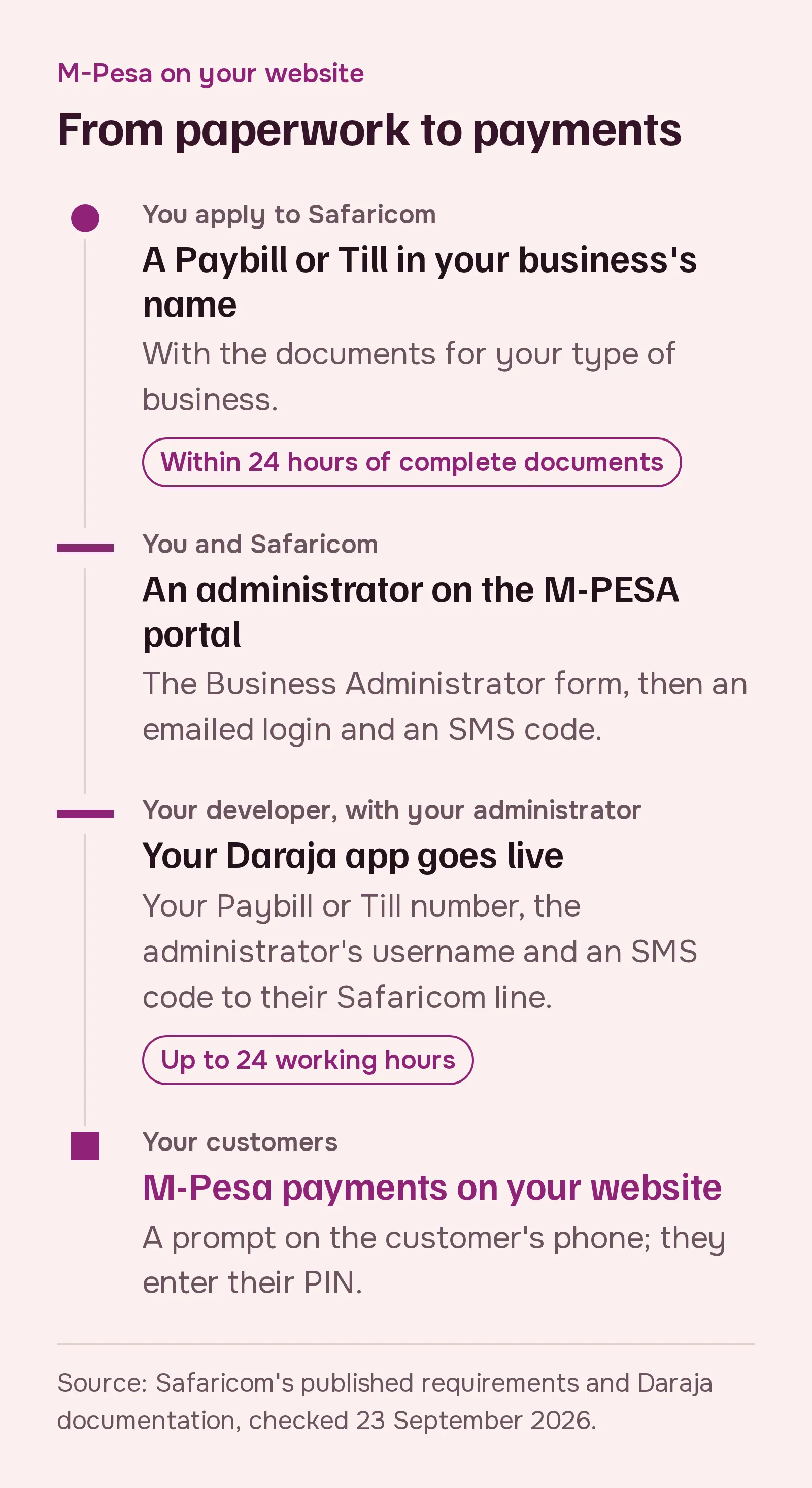
Three things, in this order:
- A Paybill or a Till in your business’s name. This is where the money lands.
- An administrator on the M-PESA business portal. A named person who manages the account online.
- A Daraja app that has gone live. Your developer builds and tests it, and your administrator approves it with a code sent to their phone.
A Paybill or a Till, not a personal number
Daraja works with a Paybill or a Till (Buy Goods). It doesn’t work with a personal M-Pesa number, and Pochi la Biashara runs on a personal line, so neither can take payments from a website. Safaricom’s developer FAQ is plain about it: Daraja has no customer-to-customer API.
Both a Paybill and a Till work with M-Pesa Express, the prompt on the customer’s phone. Which one suits you is the subject of Paybill or Till: which one should your website use?
If you choose a Till, ask for bank settlement through a Head Office. Safaricom’s Daraja documentation says a Till gets portal access that way, and the Head Office number is what goes live.
What every applicant needs
Whatever your type of business, Safaricom’s 2026 list asks for:
- the application form and terms, signed and stamped or sealed
- for a Paybill, Safaricom’s tariff guide (its list of charges), signed
- copies of IDs, and a valid work permit for any foreign contact person
- proof of your bank account: a cancelled cheque, a certified bank statement or a certified bank letter, in exactly the name you’re registered under
- if you sell online, a company profile and a link to your working website
The names must match everywhere: on the registration certificate, the bank proof and the forms. A mismatch sends the application back.
Most types of business also need an authorization. That is Safaricom’s M-PESA Authorization Form, or signed minutes or a resolution. Whichever you use, it must state the purpose of the account, the source of funds, the people allowed to operate it (including the Business Administrator) and your bank details.
Documents by type of business
Sole proprietor
- a Certificate of Registration or a business permit
- the IDs of the owner and the contact person
- to be paid out to a bank, which Daraja needs: the owner’s KRA PIN and the bank proof above
- if the permit doesn’t show the owner’s name, a certified beneficial ownership declaration
Limited company
- the Certificate of Incorporation
- a CR12 no more than 30 days old on the day Safaricom receives it. Some older Safaricom forms still say 90 days; a CR12 from the last 30 days meets both.
- the authorization, signed by at least two directors
- the company’s KRA PIN, and the KRA PINs of Kenyan directors, shareholders and beneficial owners
- the IDs of all directors, shareholders and beneficial owners, and of the people who will run the account day to day
- a beneficial ownership form (BOF1) from the Business Registration Service
- bank proof in the company’s name
If a shareholder is itself a company, Safaricom also asks for that company’s CR12, KRA PIN, certificate and IDs.
Partnership
- the authorization, signed by at least two partners
- the partnership deed, or an affidavit
- the Certificate of Registration, certified
- a licence from your professional body, if your profession has one
- a BOF1 from the Business Registration Service
- the firm’s KRA PIN and the partners’ KRA PINs
- the IDs of all partners, and of the people who will run the account
- bank proof
Not registered yet
If you trade under your own name without registering, Safaricom offers a Buy Goods Till only, with your ID. To be paid out to a bank, you add your KRA PIN and bank proof.
We suggest registering a business name first. It opens up a Paybill and makes every later step simpler. Either way, check with Safaricom that your account can go live on Daraja before you pay for a website built around it. If you can’t register yet, a payment gateway may suit you better for now: see M-Pesa straight from Safaricom, or through a payment gateway?
Non-profits, churches, groups and schools
The same pattern applies, with your own registration documents. From Safaricom’s 2026 list:
- Public Benefit Organizations (NGOs now register as PBOs): the PBO certificate of registration, certified. Safaricom’s list also names a letter from the PBO Regulatory Authority confirming your registration and officials, and a valid PBO certificate of compliance, so ask Safaricom which of these it needs from you. Add the authorization, a BOF1 on Safaricom’s template, the IDs of signatories, officials and operators, the KRA PINs of Kenyan officials, the organization’s KRA PIN or tax exemption certificate, and bank proof.
- Churches and other religious organizations: the certificate of registration, certified; the authorization; a BOF1 on Safaricom’s template; IDs; the organization’s KRA PIN; and bank proof.
- Registered groups, including chamas, self-help groups and community-based organizations (CBOs): the same list as religious organizations.
- Co-operative societies: the same list, with the co-operative’s certificate.
- Private schools: the business registration and the Ministry of Education licence (or, for colleges and universities, the licence from the Technical and Vocational Education and Training Authority or the Commission for University Education, or the Act of Parliament that set the institution up), a BOF1 listing the owner and senior officers, IDs, the owner’s KRA PIN and bank proof. A school run as a company uses the limited company list, plus the licence.
Safaricom’s 2026 section on public schools is unclear. If you run one, ask Safaricom directly.
Beneficial owners
Every Paybill and Till holder must now declare its beneficial owners: the people who ultimately own or control the business. Safaricom collects this under Kenya’s anti-money-laundering rules, through its beneficial owners page. If you already have a Paybill or Till and haven’t done this, do it before you start on a website.
Getting into the M-PESA business portal
Your Daraja app goes live through a person on the M-PESA business portal, so you need one before your developer can finish.
The Business Administrator form is signed and stamped by two of your signatories or directors, and asks for:
- your Paybill or Till number (the shortcode) and organization name
- the administrator’s preferred username, names, nationality, ID number and date of birth
- their personal email address, where the login details are sent
- their Safaricom phone number
- for churches, NGOs and other institutions: a board resolution on letterhead, the registration certificate, and the IDs of two signatories and of the administrator
- for a limited company: a recent CR12
The first login uses the emailed password, a code on the screen and a code sent by SMS. You then set your own password.
Two roles matter. A Business Administrator creates users but can’t see or move money. A Business Manager can approve payments, see statements and withdraw. Either one can take your Daraja app live, so choose carefully who holds these roles, and keep their phone numbers up to date.
Going live on Daraja
Your developer builds and tests on Daraja’s sandbox first, with test credentials. When your website is ready:
- On the Daraja portal, your developer opens your app’s Go Live tab.
- They enter your shortcode (the Paybill, or the Till’s Head Office number) and your organization name, shortened and without special characters.
- They enter the username of your Business Administrator or Business Manager exactly as it is on the portal. It’s case-sensitive.
- Safaricom sends a code by SMS to that person’s phone, which must be a Safaricom line. They pass it on, and your developer enters it.
Safaricom says it approves go-live within 24 working hours. Your developer then gets the live keys and switches your website over. M-Pesa Express also uses a passkey, which Safaricom provides for your account. Too many go-live attempts get blocked, so have the username and the phone ready before you start.
What to hand your developer
- your shortcode, and whether it’s a Paybill or a Till (with the Head Office number for a Till)
- the exact username of your Business Administrator or Business Manager
- that person, with their Safaricom phone, available on the day your app goes live
- a domain for your website, with HTTPS (the padlock in the browser)
And one note for your developer: Safaricom only sends payment results to public HTTPS addresses, and it rejects addresses that contain words such as “mpesa”, “safaricom”, “sql” or “cmd”.
Where applications get stuck
From Safaricom’s own rules and documentation:
- names or bank details that don’t match the registration
- a CR12 older than 30 days
- a missing BOF1 or beneficial owner declaration
- forms that aren’t signed and stamped
- no website link for a business that sells online
- no work permit for a foreign contact person
- at go-live: a username in the wrong case, a user without the administrator or manager role, a phone that isn’t a Safaricom line, or special characters in the organization name
How long it takes, and what it costs
- Applying for a Paybill or a Till is free.
- Safaricom processes a Paybill within 24 hours of receiving complete documents. A Till takes 24 hours, or about 10 minutes for an individual.
- Going live on Daraja takes up to 24 working hours.
- What each payment costs you depends on whether you use a Paybill or a Till: see Paybill or Till.
The slow part is gathering the documents. Once they’re in, connecting your website takes days, not weeks. If you’d like us to handle that part, talk to us.
Sources
- Safaricom, Lipa na M-PESA KYC Requirements 2026
- Safaricom, Lipa na M-PESA account opening
- Safaricom, M-PESA Paybill FAQs
- Safaricom, Business Till
- Safaricom, M-PESA Business Administrator form
- Safaricom, Beneficial owners information update
- Safaricom, M-PESA business channels and portals FAQs
- Safaricom, Pochi la Biashara FAQs
- Safaricom Daraja: M-Pesa Express, Customer to Business, Getting started and FAQs
- Safaricom, Daraja 3.0 launch
- M-PESA for Business, self-onboarding FAQs